
Garmin Edge 840 Review: Worth Upgrading?
The Garmin Edge 840 sits in the middle of Garmin’s lineup — larger and more capable than the Edge 540, but without the full open-platform features of the Edge 1040. At around €300 for the standard version, it costs roughly €50-70 more than the Edge 540, and the question is whether that gap buys enough to matter.
The short answer: it depends on your eyes and your ambitions. The larger screen is the main reason to choose the 840 over the 540. The additional metrics — hill score, endurance score — are useful extras, but they are not the reason to spend the extra money.
What the Edge 840 does well
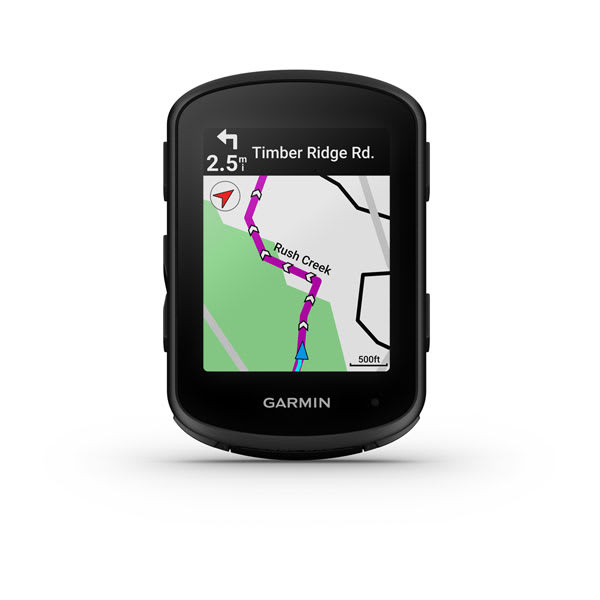
Screen size and readability. The 3.5” MIP display (282×470 pixels) is noticeably larger than the Edge 540’s 2.6” screen (246×322 pixels). On a map view, you see more of the route ahead. When running complex data fields mid-ride, the text is readable at a glance without slowing down or squinting. If you regularly navigate through unfamiliar roads or complex singletrack, this matters. If you primarily follow pre-loaded routes on familiar ground, it matters less.
ClimbPro 2.0. The Edge 840 uses the same ClimbPro 2.0 system as the Edge 1040 — it shows gradient, remaining distance, and estimated effort for each climb on a loaded course. It works well when the route is pre-planned. On spontaneous climbs it provides real-time gradient only. For anyone who plans structured rides or races with known profiles, ClimbPro is genuinely useful data.
Hill Score and Endurance Score. These are exclusive to the Edge 840 and 1040 within the current lineup. Hill Score rates your climbing ability relative to your training history. Endurance Score tracks your base fitness for sustained efforts. Both metrics require several weeks of training data to become meaningful, and they are primarily useful for coaches or self-coached riders who track long-term fitness trends. Casual riders will rarely look at them.
Navigation accuracy. The Edge 840 uses GPS, GLONASS, and Galileo. In practice, the track holds accurately in open terrain, forest trails, and between buildings in urban environments. Accuracy in deep canyons or dense forest is similar to what any modern consumer GPS unit delivers — occasional small deviations, not persistent errors.
Build quality. The Edge 840 is IPX7 rated (immersion up to 1m for 30 minutes). The buttons are clearly defined and work with winter gloves. The mount locks into the standard Garmin quarter-turn mount system. The unit has survived multiple seasons of daily use reports from riders in wet climates without hardware failures being a common complaint on forums.
Where the Edge 840 falls short
Price jump for marginal extras. The Edge 540 covers ClimbPro, full routing maps, training load, and advanced metrics like VO2 max and race predictor — all the tools that most riders use daily. The €50-70 premium for the Edge 840 buys you a larger screen and hill score / endurance score. That is a real value question that comes down to whether the bigger screen matters to you personally.
Weight. At 104g, the Edge 840 is 21g heavier than the Edge 540. On a road bike where weight is a consideration, this is worth noting. On a gravel or MTB setup where the bike itself is already heavier, it is irrelevant.
Solar version caveats. The Edge 840 Solar extends battery life significantly, but the quoted 61h figure requires ideal solar exposure — not the reality on overcast northern European rides or rides through forest canopy. Real-world solar gains on a 4-5 hour ride in summer might be 15-25% extra runtime. The Solar version adds about €60 to the price, which makes sense mainly for ultra-distance rides where you genuinely cannot charge mid-event.
Garmin Connect ecosystem lock-in. The Edge 840 relies on Garmin Connect for map updates, route syncing, and training analysis. If you prefer working with third-party platforms (Strava, TrainingPeaks, Intervals.icu), everything syncs fine via exports, but the in-device features like daily suggested workouts depend on Garmin’s ecosystem. Not a problem for most riders, worth knowing before buying.
Edge 840 vs Edge 540: the actual decision
The Edge 540 and Edge 840 share the same processor, satellite performance, sensor connectivity, and training metric library. The differences are:
- Screen: 3.5” vs 2.6”
- Hill Score / Endurance Score: 840 only
- Weight: 104g vs 83g
- Battery (Solar): 61h vs 42h (Solar versions)
- Price: ~€300 vs ~€250
For riders who navigate extensively using maps — bikepacking, gravel events, multi-day touring — the larger screen is the clear argument for the 840. For road or MTB riders who load a route and follow the arrow, the Edge 540 covers the same job at a lower price.
If you are buying your first dedicated cycling GPS and looking at this price range, the Edge 540 is the smarter default. If you are upgrading from a unit with a small screen and found that frustrating, the 840 solves that specific problem well.
Real-world use
The Edge 840 mounts via the standard Garmin quarter-turn system. The quarter-turn mechanism is reliable — it does not rattle or work loose on rough trails in any real-world riding scenario reported by users. Out-front mounts (from Garmin or third parties like K-Edge) place the unit where you can see it without looking down, which matters more on the larger 840 where map views are actually worth watching.
Setting up the Edge 840 from scratch takes 20-30 minutes: pair with Garmin Connect on a phone, accept map updates (which can be slow on the first sync), configure data screens, and pair sensors. The process is guided but not fast. It is significantly easier than setting up the unit manually. After initial setup, adding a new route from Komoot or Strava to the device takes under a minute through the app.
Data screen customization is flexible. The Edge 840 supports up to 10 data fields per screen, and you can configure multiple screens to switch between during a ride. The default screens are reasonable starting points, but most riders reconfigure them to match what they actually watch. Commonly useful MTB configurations: a primary screen with speed, elevation gain, grade, and power (if using a power meter), plus a map screen for navigation.
The automatic lap detection (based on segments or manual) works well for structured training. For trail riding without structured intervals, auto-lap by distance is the most practical setting — it gives periodic check-ins on pace and climb without requiring manual interaction mid-ride.
Hill Score in practice. After a month of riding, Hill Score builds a baseline and starts showing relative performance. It compares your climbing performance on a given day to your historical baseline. The metric is genuinely informative — it identifies rides where you climbed better than average and those where you were clearly off. Whether you adjust training based on this data is personal, but it is not noise: it correlates meaningfully with subjective feel and heart rate trends.
Long ride performance. Battery accuracy on the stated 26 hours is solid — GPS-only mode with sensors running sits comfortably in the 24-27 hour range in practice. For rides over 8-10 hours, a battery bank in a jersey pocket with a USB-C cable is an option; the Edge 840 charges while recording, which is useful for endurance events.
Initial setup and pairing
Garmin Connect is the configuration bridge. The app handles sensor pairing, map downloads, route transfers, and firmware updates. Pairing a heart rate strap takes under 60 seconds via ANT+ scan. Adding a power meter via ANT+ is equally straightforward — the unit identifies the meter model automatically and applies the correct FTP-based zones.
Wi-Fi sync is a useful feature for post-ride uploads: when you return home and the device comes within range of a paired network, rides upload to Garmin Connect automatically without needing to touch the phone. A minor detail but one that removes friction in the daily routine.
Map updates download free via Garmin Express on a computer or through Garmin Connect on a phone. Initial map coverage is regional and includes routable roads, paths, and off-road trails. Quality varies by region — Western Europe coverage is detailed; less-mapped territories have sparser trail data.
Alternatives worth considering
Garmin Edge 540 (~€250): Same performance, smaller screen, 21g lighter, €50 less. The better choice for most riders unless the screen size is a specific priority. See the Garmin Edge 540 review for the full breakdown.
iGPSPORT iGS800 (~€200): A larger-screen option from iGPSPORT at a lower price than the Edge 840. Navigation is less refined than Garmin, and the ecosystem is thinner, but for riders who prioritize screen size and sensor connectivity on a budget, it is worth comparing. The iGPSPORT iGS800 vs BSC300T comparison covers the iGS800’s capabilities in detail. The direct comparison to the Edge 540 is in the Garmin Edge 540 vs iGPSPORT iGS800 breakdown.
Wahoo Elemnt Bolt V2 (~€280): Different design philosophy — minimalist display, fast pairing, excellent Strava integration. No on-device training metrics, but the simplest ride-and-go experience in this price range. See the Wahoo Elemnt Bolt review.
Garmin Edge 1040 (~€500): Justifies itself only for ultra-distance events, serious coaches, or riders who want an open platform for custom data fields. Overkill for regular training and recreation. The Garmin Edge 1040 vs Wahoo Elemnt Roam V2 comparison is the right read if you’re considering flagship money.
Verdict
The Garmin Edge 840 is a well-made, accurate, feature-complete cycling GPS. It earns its price if the larger screen is something you will genuinely use — for navigation, map reading, or simply more comfortable data viewing. The hill score and endurance score are legitimate extras for metric-focused riders.
It does not earn its premium if you primarily follow pre-loaded routes and care more about saving weight and money. In that case, the Edge 540 does the same job and does it well.
Score: 8/10. An excellent unit that justifies upgrading from older or entry-level devices. A harder sell as a step up from the Edge 540 unless the screen size is the deciding factor.


Deja un comentario